Disclosure: As an Amazon Associate, I earn from qualifying purchases. If you buy through links on this page, I may earn a small commission at no extra cost to you.
Amazon Echo Dot (5th Gen) Review: The Small Speaker That Runs the Smart Home
There is a moment almost every smart-home owner remembers. You walk in the door, arms full of groceries, and instead of fumbling for a light switch you just say it: “Alexa, turn on the lights.” The room wakes up. Music follows. The fan adjusts itself because the room got warm. And the device that made it all happen sits on your shelf the size of a tennis ball, glowing a soft blue ring.
That device is the Amazon Echo Dot (5th Generation) – and four years after its release, it is still Amazon’s best-selling smart speaker. Not because it is the most powerful, but because it is the one that does the job: better sound than the 4th generation, a built-in temperature sensor and motion detection for genuinely useful routines, Matter support for the new generation of smart-home gadgets, and a price that makes it the easiest upgrade decision in the room.
But 2026 has options. The cheaper Echo Pop exists. Alexa+ is rolling out with new voice powers. And the honest question has changed. It is no longer “Is the Echo Dot worth it?” (It is.) It is: “Is the 5th Gen Echo Dot still the best budget smart speaker to buy – or should you save money with the Pop?”
That is the question this review answers – properly, with the strengths, the flaws, the mistakes new owners make, and the comparison nobody should skip.
👉 Check the Latest Price on Amazon
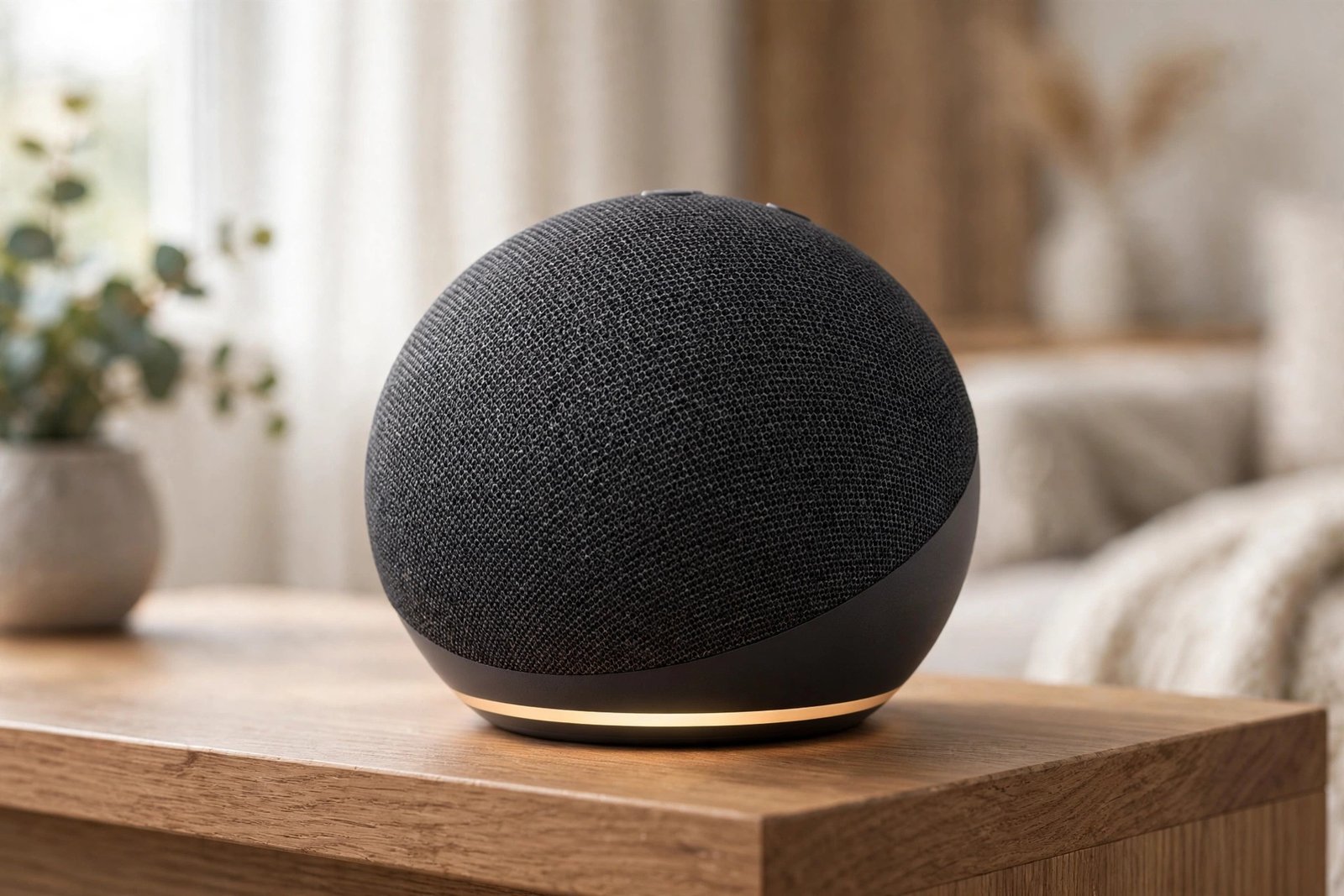
What the Echo Dot (5th Gen) Actually Does
- Bigger, richer sound – a 1.73-inch front-firing speaker with noticeably more vibrant audio than the 4th generation; fine for a bedroom, office or kitchen
- Alexa on call – music and audiobooks, podcasts, timers, alarms with tap-to-snooze, questions, weather, news – all hands-free
- Temperature sensor – the Dot can trigger routines from the room’s temperature, e.g. turning on a fan when it gets warm
- Motion detection – routines that fire when someone enters the room; lights on as you walk in, off when the room is empty
- Matter and BLE Mesh support – works with the newest generation of smart-home devices, so it stays current as the standard spreads
- Routines for everything – one command runs a chain of actions: lights, plugs, music, announcements across the house
- Privacy controls – a physical mic-off button plus voice recording controls for the cautious
The Real Secret: It Is Not the Speaker, It Is the Routines
Here is what a few weeks of Echo Dot ownership teaches you: the Dot’s real product was never the speaker. It was the routine. The sound is good enough for podcasts and background music, but what changes your home is saying one sentence and having ten things happen at once.
Judge any smart speaker by that standard: does it quietly remove friction from your day? The Echo Dot passes that test so thoroughly that owners stop thinking of it as a speaker at all – it becomes the button-free remote for the whole house. The speaker is just the part you talk to.
Everyday Life With the Echo Dot: Mornings, Evenings, and the Temperature Sensor
The morning routine: This is where the Dot quietly earns its keep every single day. One command – “Alexa, start my day” – and the bedroom light fades up, the coffee plug (timed, not brewed) clicks on, the news plays, and the weather is read out while you get dressed. Owners call it the difference between “rushing the morning” and “the morning running itself” – and they are not exaggerating.
The empty-house guard: The temperature sensor and motion detection exist for this scenario. Set a routine so the fan plugs on when the room crosses a threshold, or get notified when motion is detected while you are at work. Paired with smart plugs, the Dot becomes a free house-sitter for the sensors it already has inside it.
The evening wind-down: “Alexa, good night” and the living-room lights go out, the door locks (if smart), the bedroom lamp dims, and a sleep timer starts a rain-sounds playlist. In 2026, with Alexa+ adding more natural conversation, these routines feel less like commands and more like asking a roommate.
The honesty part: The Dot is not an audiophile speaker. At high volume it compresses and thins out – it is a bedroom, kitchen or office speaker, not a party speaker. Know that going in and you will never be disappointed.
Echo Dot (5th Gen) vs Echo Pop vs 4th Gen: Which One in 2026?
| Echo Dot 5th Gen (reviewed here) | Echo Pop | Echo Dot 4th Gen | |
|---|---|---|---|
| Sound | 1.73-inch speaker – the best of the three | Smaller speaker, thinner sound | 1.6-inch speaker – slightly weaker |
| Sensors | Temperature sensor + motion detection | No temp sensor; basic motion | No temp sensor |
| Smart home | Matter + BLE Mesh support | Basic; fewer smart-home radios | Older standards |
| Best for | The smart default – rooms you live in | Bedside alarms and basic Alexa on a budget | Only if found deeply discounted |
| Trade-off | Costs a little more than the Pop | Worse sound, fewer sensors, fewer routines options | Superseded in every way by the 5th Gen |
The honest summary: the Echo Dot 5th Gen is the smart default. The Pop is for a nightstand that only needs alarms and timers. The 4th Gen only makes sense at a steep discount. If you are buying your first budget smart speaker in 2026, start with the 5th Gen Dot.

Common Mistakes New Owners Make
Mistake 1: Placing it against the wall or in a corner. The 5th Gen’s front-firing speaker needs a little breathing room – centered on a shelf, a few inches from the wall. Jammed into a corner it sounds boomy and small.
Mistake 2: Never setting up routines. Using the Dot as a kitchen timer wastes 80% of its value. The temperature sensor and motion detection are free – ten minutes of setup turns the speaker into a home automation hub.
Mistake 3: Forgetting the mic-off button exists. Privacy-conscious households should know it is there – one physical press mutes the microphones completely. No menu diving, no guesswork.
Mistake 4: Connecting it to 5 GHz Wi-Fi and wondering why it drops. The Dot uses Wi-Fi 5 and is happiest on 2.4 GHz for smart-home range and reliability. If routines lag, check which band it joined first.
Mistake 5: Expecting a party speaker. The Dot fills a bedroom beautifully and a kitchen adequately. Expecting it to carry a living-room movie night or a party is the one expectation it will not meet – add a bigger speaker via Bluetooth if you need volume.
What We Liked (Pros)
- The best sound in the budget Echo line-up – genuinely better than the 4th Gen
- Temperature sensor and motion detection unlock routines cheap speakers cannot do
- Matter support keeps it current as smart-home standards evolve
- Tap-to-snooze, drop-in intercom, announcements – the small features you end up using daily
- Privacy: a real physical mic-off button, not a software promise
- Alexa+ capable – the platform is still getting smarter, not standing still
What Could Be Better (Cons)
- Sound distorts and thins at high volume – not a party or movie-night speaker
- No Zigbee hub – you will still need one for some older smart devices
- No clock display on this version – if you want the LED display, that is a different model
- Amazon’s voice shopping is a little too eager – check your settings if you have curious kids
- Best features (routines, sensors) require the app to set up – out-of-box it is just a speaker
Who Should Buy It?
Buy it if: you want the cheapest real entry into a smart home; you use Alexa already; you want temperature and motion routines without buying extra sensors; or you need a bedroom/kitchen speaker that does more than play music.
Skip it if: you want room-filling music (get a bigger speaker), you are deep in the Apple/Google ecosystem with no interest in Alexa, or your home has no smart devices at all – in which case a Dot today is just a speaker you talk to.
Frequently Asked Questions
1. Is the Echo Dot 5th Gen still the latest model in 2026?
Yes – released in 2022, the 5th generation is still the current Echo Dot. The newer Echo Pop is a separate, cheaper line, not a 6th generation Dot.
2. Does the Echo Dot (5th Gen) have a clock display?
The version reviewed here (ASIN B09B8V1LZ3, Charcoal) does not have a clock display. Amazon sells a separate “Echo Dot with Clock” model if you want the LED display on top.
3. Can it control my smart home without a hub?
For Wi-Fi, Bluetooth and Matter devices – yes, no hub needed. It does not include a Zigbee hub, so some older Zigbee devices still need their own bridge.
4. Echo Dot vs Echo Pop – which should I buy?
The Dot for any room you live in – better sound, temperature sensor, motion detection and Matter support. The Pop only for a nightstand or desk where you just need alarms and basic Alexa.
5. What can the temperature sensor actually do?
It feeds Alexa routines: for example, “when the living room is above 78°F, turn on the smart-plug fan” or “when the bedroom drops below 65°F, start the space heater.” It turns the Dot into a thermostat trigger.
The best smart speaker is not the one with the best sound. It is the one that makes your home answer back.
Top 5 Budget Smart Speakers to Consider
- Amazon Echo Dot (5th Gen) – the one reviewed here; the smart default for most homes
- Amazon Echo Pop – cheaper, smaller sound; fine for a nightstand
- Amazon Echo Dot with Clock (5th Gen) – the same speaker plus an LED clock display
- Echo Spot (2024) – bigger display for the nightstand, if you want a screen
- Older Echo Dot (4th Gen) – still capable; worth it only at a deep discount
👉 See the Echo Dot Models and Latest Price on Amazon
Top Related Picks from The Glow Guide
Building out your smart home or cozy spaces? These related reviews pair well with the Echo Dot:
- Instant Pot Duo 7-in-1 Review – the kitchen upgrade your smart home deserves
- Ninja Air Fryer 4-Quart Review – the other countertop essential for a modern kitchen
- Stanley Quencher Review – for the drinks you sip while Alexa plays your music
Final Verdict
Four years in, the Echo Dot 5th Gen is still the budget smart speaker to beat: the best sound in its class, sensors that unlock real automation, Matter support for the future, and a price that makes it a gift as often as a purchase. Buy the Pop only for a nightstand; everything else starts here.
👉 Check the Latest Price on Amazon
Shopping reminder: Prices, sizes and availability can change. Always check the current Amazon listing before buying.
📺 Watch Our Videos & Shop Our Picks
Enjoy our reviews and guides in video form, and shop the products we recommend - subscribe and never miss an upload.
🛒 Amazon One 🛒 Amazon Two 🛒 Amazon Three